OpenLiberty – Performance

In the course of our open source project Imixs-Office-Workflow, I have now examined OpenLiberty in more detail. And I came up to the conclusion that OpenLiberty has a very impressive performance.

Docker

I run OpenLiberty in Docker in the version ‘20.0.0.3-full-java8-openj9-ubi’. Our application is a full featured Workflow Management Suite with a Web Interface and also a Rest API. So for OpenLiberty we use the following feature set:

...
	<featureManager>
		<feature>javaee-8.0</feature>
		<feature>microProfile-2.2</feature>>
		<feature>javaMail-1.6</feature>
	</featureManager>
...

As recommended by OpenLiberty I use the following Dockerfile layout:

FROM openliberty/open-liberty:20.0.0.3-full-java8-openj9-ubi
# Copy postgres JDBC driver
COPY ./postgresql-9.4.1212.jar /opt/ol/wlp/lib
# Add config
COPY --chown=1001:0 ./server.xml /config/server.xml

# Activate Debug Mode...
# COPY --chown=1001:0 ./jvm.options /config/

# Copy sample application
COPY ./imixs-office-workflow*.war /config/dropins/

RUN configure.sh

The important part here is the RUN command at the end of the Dockerfile. This script adds the requested XML snippets and grow image to be fit-for-purpose. This makes the docker build process a little bit slower, but the startup of the image is very fast.

I measured a startup time of round about 12 seconds. This is very fast for the size and complexity of this application. And it is a little bit faster than the startup of Wildfly with round about 15 seconds. Only in case of a hot-redeploy of the application Wildfly seems to be a little bit faster (6 seconds) in compare to OpenLiberty (8 seconds).

Open LibertyWildfly
Docker Startup Time12 sec15 sec
Application Hot Deploy8 sec6 sec

Debug Mode

Note: activating the debug port makes OpenLiberty performance very poor. So do not forget to deactivate debugging in productive mode! The debug mode can be activated by providing a jvm.options file like this:

-agentlib:jdwp=transport=dt_socket,server=y,suspend=n,address=7777

I have commented on this in the Dockerfile example above.
OpenLiberty and Hot-Deployment

The OpenSource application server OpenLiberty from IBM is very suitable for running microservices and web applications in production. But also for development, the server offers a very good support of autodeploy and hotdeployment.

Per default you can simply drop a new .war file into the folder /config/dropins/ and OpenLiberty will immediately deploy your application. You can configure the behavior of dropins in detail in the server.xml file.

For example, if you add the following tag into your server.xml file:

...
 <applicationManager autoExpand="true" />
....

then your application will be automatically expanded into a new folder at

${server.config.dir}/apps/expanded/APP_NAME/

Now when you deploy your application you will have a file layout like this:

./server.xml
./dropins/myapplication.war
./apps/expanded/myapplication.war/my-page.jsf
./apps/expanded/myapplication.war/WEB-INF/classes/com/foo/SomeAppClass.class

In case you use autoexpand=true than the “active” set of files will be the files under the apps/expanded/ folder which you can then hot-update. This approach is useful if you want to deploy a single .war file and then make tweaks to it after you deploy it, such as in dev mode.

javax.faces.PROJECT_STAGE

Note that the hot-deployment for JSF files is only working if your PROJECT_STAGE param is set to ‘development’. So if not yet activated add the following into your web.xml file:

<context-param>
	<param-name>javax.faces.PROJECT_STAGE</param-name>
	<param-value>Development</param-value>
</context-param>

For production it is recommended to set the parameter to ‘Production’. In this mode JSF files will be cached by OpenLiberty internally.

Alternatively you can set the param ‘javax.faces.FACELETS_REFRESH_PERIOD’ to 1 which will also force OpenLiberty to scann for changed JSF files and class files:

<context-param>
 	<param-name>javax.faces.FACELETS_REFRESH_PERIOD</param-name>
    	<param-value>1</param-value>
</context-param>

Manik Hot-Deply Plugin

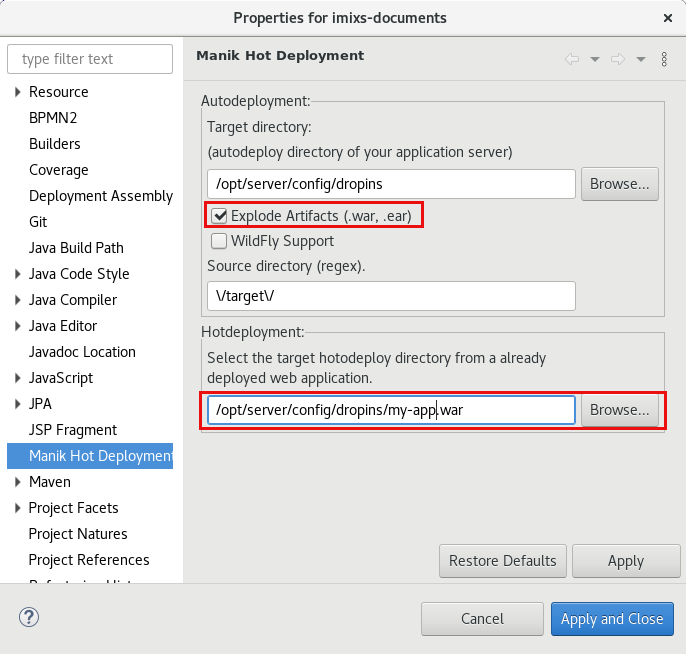
With the Eclipse Hot-Deploy Plugin ‘Manik’ you can enable autodeploy and hot-deploy easily for OpenLiberty.

If you use the Option ‘Explode Artifacts’ you can deploy the .war as a folder directly into the /config/dropins/ folder of your OpenLiberty installation. The Hotdeployment directory is than the .war/ sub directory after the first deployment. You can disable the ‘autoExpand’ feature of OpenLiberty in this case. See also the discussion here.

Microsoft Teams on Linux

I am not a friend of Microsoft at all but for some reasons I need the Tool Microsoft Teams for some of my customer projects. In the past it was not possible to join a meeting from a Linux machine. But to be honest, Microsoft is working a lot in the Linux world and also contributes a lot of code. So Microsoft is now also supporting Teams .

To install Teams on Linux Debian is quite simple:

1. Download the Debian packages ‘teams….._amd64.deb’ from the microsoft official download page:
https://teams.microsoft.com/downloads#allDevicesSection

2. To install the package from your download run:

$ sudo dpkg -i teams_1.x.xx.xxx_amd64.deb

3. Now you can launch Microsoft Teams:

$ teams

Note: To use teams you should create a Microsoft Account. I am not sure if this is really necessary but I have had already an account.

Stop Microsoft Teams From Starting Automatically on Debian/Gnome

One of the most nasty features of Teams for Linux is that it starts automatically after a reboot and it will stay in background even if you have closed teams. This is an immorality, however, that can easily be avoided.

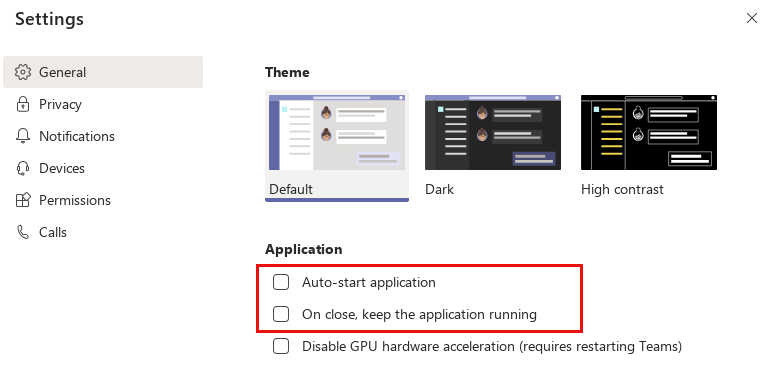
Within teams there is a ‘Settings’ dialog page where you can deactivate autostart function:

If you deactivate the first two application options Teams will be closed completely after you close the teams window. So you can be sure teams is not exchanging data in the background anymore.

To start teams manually again run:

$ teams

Kubernetes and GlusterFS

In this Blog I will explain how to install a distributed filesystem on a kubernetes cluster. To run stateful docker images (e.g. a Database like PostgreSQL) you have two choices.

  • run the service on a dedicated node – this avoids the lost of data if kubernetes re-schedules your server to another node
  • use a distributed storage solution like ceph or glusterfs storage

Gluster is a scalable network filesystem. This allows you to create a large, distributed storage solution on common hard ware. You can connect a gluster storage to Kubernetes to abstract the volume from your services. 

Continue reading “Kubernetes and GlusterFS”