Since Version 2 Traefik supports Kubernetes Ingress and acts as a Kubernetes Ingress controller. This is an alternative to the Traefik specific ingressRoute objects. With v2.2. you can now use plain Kubernetes Ingress Objects together with annotations. Of course you can still use IngressRoute objects if you need them for specific requirements.
I tested this feature within Kubernetes 1.17.3. In this blog post I want to point out the important parts of the configuration. Please note that I provide a details setup for Traefik running within a self managed Kubernetes cluster in my open source project Imixs-Cloud.
In the course of our open source project Imixs-Office-Workflow, I have now examined OpenLiberty in more detail. And I came up to the conclusion that OpenLiberty has a very impressive performance.
Docker
I run OpenLiberty in Docker in the version ‘20.0.0.3-full-java8-openj9-ubi’. Our application is a full featured Workflow Management Suite with a Web Interface and also a Rest API. So for OpenLiberty we use the following feature set:
The important part here is the RUN command at the end of the Dockerfile. This script adds the requested XML snippets and grow image to be fit-for-purpose. This makes the docker build process a little bit slower, but the startup of the image is very fast.
I measured a startup time of round about 12 seconds. This is very fast for the size and complexity of this application. And it is a little bit faster than the startup of Wildfly with round about 15 seconds. Only in case of a hot-redeploy of the application Wildfly seems to be a little bit faster (6 seconds) in compare to OpenLiberty (8 seconds).
Open Liberty
Wildfly
Docker Startup Time
12 sec
15 sec
Application Hot Deploy
8 sec
6 sec
Debug Mode
Note: activating the debug port makes OpenLiberty performance very poor. So do not forget to deactivate debugging in productive mode! The debug mode can be activated by providing a jvm.options file like this:
The OpenSource application server OpenLiberty from IBM is very suitable for running microservices and web applications in production. But also for development, the server offers a very good support of autodeploy and hotdeployment.
Per default you can simply drop a new .war file into the folder /config/dropins/ and OpenLiberty will immediately deploy your application. You can configure the behavior of dropins in detail in the server.xml file.
For example, if you add the following tag into your server.xml file:
...
<applicationManager autoExpand="true" />
....
then your application will be automatically expanded into a new folder at
${server.config.dir}/apps/expanded/APP_NAME/
Now when you deploy your application you will have a file layout like this:
In case you use autoexpand=true than the “active” set of files will be the files under the apps/expanded/ folder which you can then hot-update. This approach is useful if you want to deploy a single .war file and then make tweaks to it after you deploy it, such as in dev mode.
javax.faces.PROJECT_STAGE
Note that the hot-deployment for JSF files is only working if your PROJECT_STAGE param is set to ‘development’. So if not yet activated add the following into your web.xml file:
For production it is recommended to set the parameter to ‘Production’. In this mode JSF files will be cached by OpenLiberty internally.
Alternatively you can set the param ‘javax.faces.FACELETS_REFRESH_PERIOD’ to 1 which will also force OpenLiberty to scann for changed JSF files and class files:
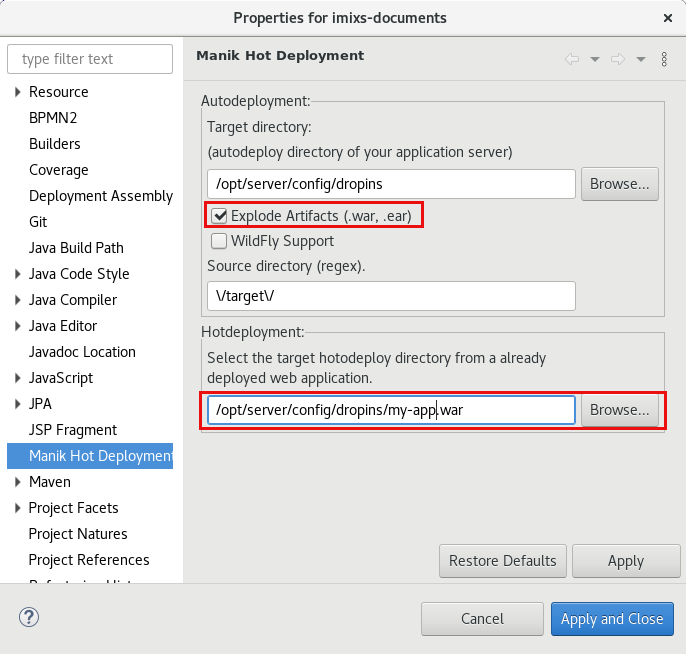
If you use the Option ‘Explode Artifacts’ you can deploy the .war as a folder directly into the /config/dropins/ folder of your OpenLiberty installation. The Hotdeployment directory is than the .war/ sub directory after the first deployment. You can disable the ‘autoExpand’ feature of OpenLiberty in this case. See also the discussion here.
I am not a friend of Microsoft at all but for some reasons I need the Tool Microsoft Teams for some of my customer projects. In the past it was not possible to join a meeting from a Linux machine. But to be honest, Microsoft is working a lot in the Linux world and also contributes a lot of code. So Microsoft is now also supporting Teams .
Note: To use teams you should create a Microsoft Account. I am not sure if this is really necessary but I have had already an account.
Stop Microsoft Teams From Starting Automatically on Debian/Gnome
One of the most nasty features of Teams for Linux is that it starts automatically after a reboot and it will stay in background even if you have closed teams. This is an immorality, however, that can easily be avoided.
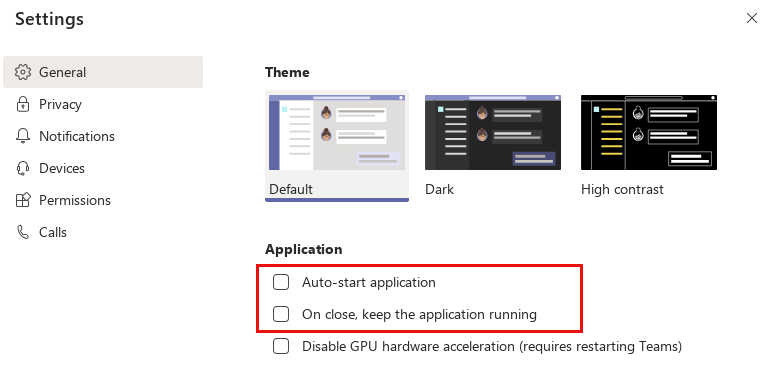
Within teams there is a ‘Settings’ dialog page where you can deactivate autostart function:
If you deactivate the first two application options Teams will be closed completely after you close the teams window. So you can be sure teams is not exchanging data in the background anymore.
In this Blog I will explain how to install a distributed filesystem on a kubernetes cluster. To run stateful docker images (e.g. a Database like PostgreSQL) you have two choices.
run the service on a dedicated node – this avoids the lost of data if kubernetes re-schedules your server to another node
use a distributed storage solution like ceph or glusterfs storage
Gluster is a scalable network filesystem. This allows you to create a large, distributed storage solution on common hard ware. You can connect a gluster storage to Kubernetes to abstract the volume from your services.
In this blog I will explain how to install the Ceph storage system on CentOS. In my previous blog I showed how to install ceph on Debian. But the newer version of ceph are not supported by Debian and Ceph is much better supported by CentOS because RedHat maintains both CentOS and Ceph.
In this blog I will install Ceph ‘Nautilus’ on CentOS 7. You will find detailed information about ceph and the installation process for nautilus release here.
In this blog I show how to setup a Kubernetes Storage Volume with Ceph. I assume that you have installed already a kubernetes cluster with one master-node and at least three worker-nodes. On each worker node you need a free unmounted device used exclusively for ceph. Within the ceph cluster I setup a Ceph Filesystem (CephFS) that we can use as a storage volume for kubernetes.
In my last blog about Traefik I showed how you can setup Traefik version 1.7 in a Kubernetes cluster. In this blog I will explain how to use the latest version 2.1 of Traefik. Version 2.x Traefik implements some new concepts and need of course a different setup. This blog post assumes that you have already an up and running Kubernetes master node and at lease one worker node. See also my Blog ‘From docker-swarm to kubernetes. You can find also detailed information in the official traefik website. A helpful tutorial can also be found here.
In my last blog I showed how you can setup a Kubernets cluster by your own. If your cluster is running in the internet you need some kind of load balancer to access your apps from outside. Traefik is a popular load balancer and reverse-proxy service useful also in a KUbernetes cluster. This tutorial is based on Traefik 1.7 and assumes that you have already an up and running Kubernetes master node and at lease one worker node. You can find also detailed information in the official traefik website.
Running payara server for test or production requires sometimes more details about the running services. In this case you can increase the log level for a java-package or a single java class.
First you need to log into the server and run the asadmin command:
$ cd ~/appserver/glassfish/bin
$ asadmin
Next you can list the current loggers:
asadmin> list-log-levels
Enter admin password for user "admin">
ShoalLogger
com.hazelcast
com.sun.enterprise.server.logging.GFFileHandler
com.sun.enterprise.server.logging.SyslogHandler
.......
To set a specific log level run
set-log-levels com.foo.MyService=FINEST
And don’t forget to disable the log level after debugging 😉